


Modern heavy-duty diagnostics requires more than a basic computer. Technicians working with commercial trucks, diesel engines, construction machinery, and agricultural equipment often need a complete system capable of running specialized diagnostic applications and communicating with electronic control modules.
A heavy duty diagnostic laptop combines a suitable computer with diagnostic software and, depending on the configuration, compatible communication hardware. This creates a practical platform for technicians who need professional diagnostic capabilities in a workshop or field environment.
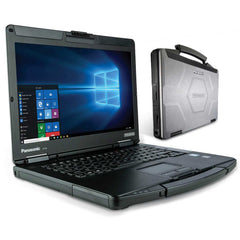
What Is a Heavy Duty Diagnostic Laptop?
A heavy-duty diagnostic laptop is a computer configured for vehicle and equipment diagnostics.
Unlike an ordinary laptop used only for general office tasks, a diagnostic laptop may be prepared with specialized software, drivers, communication interfaces, and other tools required for heavy-duty electronic troubleshooting.
Depending on the configuration, a complete setup may include:
- A rugged or business-class laptop
- Diagnostic software
- Communication interface
- Connection cables
- Required drivers
- Software configuration
- Technical support
The exact components depend on the selected diagnostic package.
Why Use a Dedicated Diagnostic Laptop?
Technicians often work with multiple vehicles and machines during the same day.
Using a dedicated diagnostic computer can help keep diagnostic software and required configurations organized in one place.
This can be especially useful for mobile technicians who travel between workshops, fleet yards, farms, construction sites, and other locations.
A dedicated system can reduce the need to repeatedly configure a personal or office computer for diagnostic work.
Heavy-Duty Diagnostics in the Field
Heavy equipment is not always located inside a repair shop.
A construction machine may be operating at a remote jobsite. Agricultural machinery can be several miles from a workshop. A commercial truck may experience a fault while away from its normal maintenance location.
A portable diagnostic laptop can allow technicians to bring diagnostic capabilities directly to the vehicle or machine.
This can save time when transporting large equipment to a service facility is difficult.
What Makes a Good Diagnostic Laptop?
Several factors should be considered when selecting a diagnostic laptop.
Hardware Performance
The computer should have sufficient processing power, memory, and storage for the software being installed.
Diagnostic applications can have different hardware requirements, so checking compatibility before purchase is important.
Operating System Compatibility
Diagnostic software may require a particular operating-system environment. The laptop should be compatible with the software requirements.
Connectivity
A diagnostic laptop needs appropriate connectivity for the interfaces and equipment it will communicate with.
USB ports and other connection options can be important when using diagnostic adapters.
Durability
Heavy-duty technicians may work in garages, workshops, field environments, and outdoor locations.
A durable computer can be more practical than a standard consumer laptop when the working environment is demanding.
Screen and Usability
Technicians may need to view detailed data, graphs, system information, and diagnostic procedures. A clear display and comfortable keyboard can make extended diagnostic work easier.
Software Is Just as Important as Hardware
Buying a powerful laptop does not automatically create a professional diagnostic system.
The software must be compatible with the equipment being serviced, and the communication interface must work correctly with the computer and software.
A complete diagnostic solution should therefore be considered as a combination of hardware, software, communication equipment, and configuration.
Heavy Duty Diagnostic Laptops for Mixed Equipment
Professional repair businesses may work with many types of equipment.
One day a technician may diagnose a commercial truck, while another job involves agricultural or construction machinery.
A multi-system diagnostic laptop can provide a convenient platform for accessing different compatible diagnostic environments.
However, users should always confirm exactly which software and equipment are supported rather than assuming that every laptop works with every vehicle.
Benefits for Repair Shops
A properly configured diagnostic laptop can help repair shops:
- Organize diagnostic software
- Improve technician mobility
- Reduce setup time
- Support multiple diagnostic applications
- Investigate electronic faults efficiently
- Provide field diagnostic services
- Maintain a dedicated diagnostic environment
These benefits can be particularly useful for workshops handling a variety of heavy-duty equipment.
Diagnostics and Fleet Maintenance
Fleet maintenance teams can also benefit from portable diagnostic systems.
A technician can use a suitable laptop during inspections, scheduled maintenance, and troubleshooting.
Electronic diagnostic information can be combined with service records, physical inspections, driver feedback, and maintenance schedules.
This creates a broader view of vehicle condition and can help teams identify problems before they cause unexpected downtime.
How to Choose the Right Diagnostic Laptop
Before purchasing, make a checklist of the equipment you need to service.
Identify:
- Vehicle and equipment types.
- Supported model years.
- Required diagnostic software.
- Required communication interfaces.
- Computer specifications.
- Operating-system requirements.
- Field or workshop usage.
- Technical support requirements.
This process helps ensure that the selected system matches real-world workshop requirements.
Frequently Asked Questions
What is a heavy-duty diagnostic laptop?
It is a computer configured to support specialized diagnostic software and communication hardware used for trucks, diesel vehicles, and heavy equipment.
Can a diagnostic laptop be used for trucks?
Yes, provided the laptop contains compatible software and is connected through suitable diagnostic hardware.
Can one laptop support multiple diagnostic systems?
A properly configured laptop may support multiple compatible diagnostic applications, depending on hardware, software, licensing, and system requirements.
Is a rugged laptop necessary?
Not always, but rugged or durable hardware can be useful for technicians who frequently work in demanding workshop or field environments.
Conclusion
A heavy-duty diagnostic laptop can provide technicians with a portable and organized platform for professional electronic troubleshooting.
The most important consideration is not simply the laptop itself. A successful diagnostic setup requires compatible hardware, appropriate software, suitable communication interfaces, and correct configuration.
For truck repair shops, fleet maintenance teams, mobile technicians, and heavy-equipment professionals, a properly selected diagnostic laptop can make electronic troubleshooting more convenient and efficient while supporting a structured approach to modern vehicle and equipment maintenance.